Online privacy has become a growing concern as more people work remotely, use public Wi-Fi, and access websites from different regions. Two technologies that frequently come up in discussions about privacy and unrestricted browsing are proxies and Virtual Private Networks (VPNs). While both can help hide your IP address, they are designed for different purposes and offer different levels of security.
Many users assume that a proxy and a VPN are the same thing. In reality, they work differently, protect different parts of your internet connection, and are suitable for different use cases. Choosing the wrong solution may leave your data less protected than you expect or add unnecessary complexity for simple browsing tasks.
In this guide, we’ll explain how proxies and VPNs work, compare their strengths and limitations, and help you decide which option best fits your needs. Whether you’re looking to browse anonymously, protect your connection on public Wi-Fi, or simply understand the technology behind online privacy, this article provides a clear, practical overview.
What Is a Proxy?
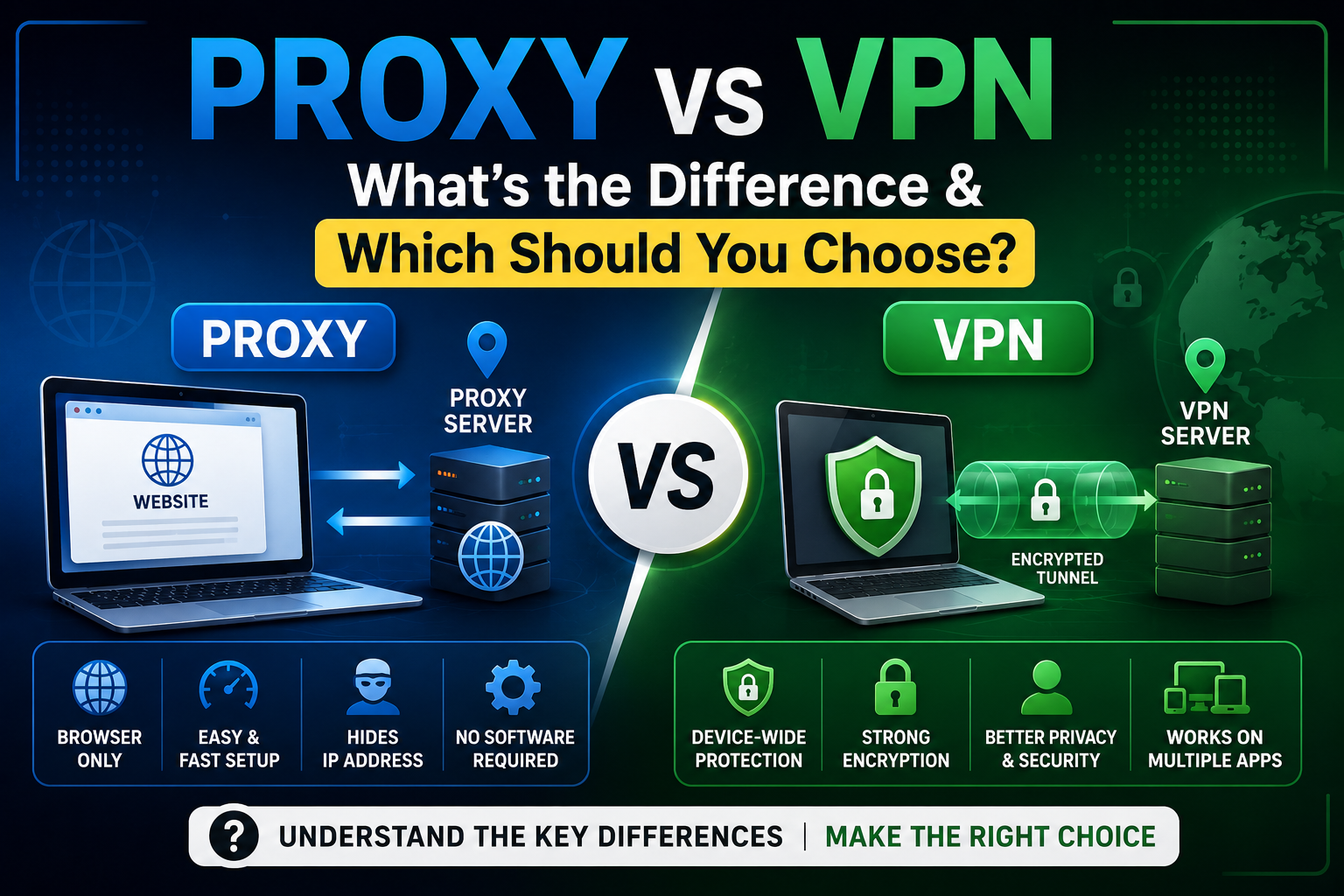
A proxy server is an intermediary between your device and the website or online service you want to access. Instead of connecting directly to the destination, your request first goes to the proxy server. The proxy then forwards the request to the website and returns the response to your browser.
Because the website communicates with the proxy server rather than directly with your device, it typically sees the proxy’s IP address instead of your own. This can provide a degree of anonymity and help with tasks such as accessing publicly available content or masking your IP address during casual browsing.
How a Proxy Works
Your Browser
      │
      ▼
Proxy Server
      │
      ▼
Website
      │
      ▼
Proxy Server
      │
      ▼
Your Browser
Unlike a VPN, a browser-based proxy generally only handles traffic that passes through the browser session using the proxy.
Types of Proxy Servers
Web Proxy
A web proxy runs entirely in your browser. You visit the proxy website, enter the URL you want to access, and browse through the proxy without installing software.
Browser-based services such as BlueProxy follow this model, making them convenient for users who need quick access without changing device settings.
HTTP Proxy
An HTTP proxy is designed for standard web traffic using the HTTP protocol. It is suitable for basic browsing but does not provide encryption by itself.
HTTPS Proxy
An HTTPS proxy supports secure HTTPS connections, allowing encrypted communication with compatible websites.
SOCKS Proxy
SOCKS proxies operate at a lower network level and can handle different types of internet traffic beyond standard web browsing, making them useful for certain applications.
Residential Proxy
Residential proxies route traffic through IP addresses assigned to real internet service customers. They are often used for tasks that require traffic to appear as if it originates from residential connections.
Datacenter Proxy
Datacenter proxies use IP addresses from cloud providers or hosting companies rather than residential ISPs. They are typically faster but may be easier for websites to identify as proxy traffic.
Advantages of Using a Proxy
A proxy can be an excellent choice for lightweight browsing and quick online tasks.
Some common advantages include:
- No software installation required
- Easy to use through a browser
- Temporary IP masking
- Convenient access on shared computers
- Useful for website testing
- Simple setup
- Works on most devices with a web browser
For users who only need occasional anonymous browsing, a browser-based proxy can be a practical solution.
What Is a VPN?
A Virtual Private Network (VPN) creates an encrypted connection between your device and a VPN server. Instead of only routing browser traffic, a VPN typically protects all internet traffic from your device.
When connected to a VPN, your internet traffic passes through an encrypted tunnel before reaching the destination website or online service.
This provides stronger privacy than a browser proxy because applications outside the browser—such as email clients, messaging apps, and cloud storage software—also use the protected connection.
How a VPN Works
Your Device
      │
      ▼
Encrypted VPN Tunnel
      │
      ▼
VPN Server
      │
      ▼
Website
      │
      ▼
VPN Server
      │
      ▼
Encrypted Tunnel
      │
      ▼
Your Device
The website generally sees the VPN server’s IP address rather than your own.
Key Features of a VPN
Unlike browser proxies, VPNs provide protection for your entire device.
Common features include:
- Device-wide encryption
- IP address masking
- Protection on public Wi-Fi
- Secure remote work connections
- Support for multiple applications
- Cross-platform compatibility
- Optional kill switch (provider dependent)
These features make VPNs suitable for users who require stronger privacy and security.
Proxy vs VPN: Quick Comparison
| Feature | Proxy | VPN |
|---|---|---|
| Installation Required | Usually No | Usually Yes |
| Browser-Based | Yes | No |
| Device-Wide Protection | No | Yes |
| IP Address Masking | Yes | Yes |
| Encrypts All Traffic | No | Yes |
| Protects Apps Outside Browser | No | Yes |
| Works on Public Wi-Fi | Limited | Yes |
| Mobile Support | Yes | Yes |
| Good for Casual Browsing | Yes | Yes |
| Better for Sensitive Activities | No | Yes |
| Suitable for Remote Work | Limited | Yes |
| Typical Cost | Often Free | Free & Paid Options |
How Does a Browser Proxy Work?
Although using a browser proxy feels simple, several steps happen behind the scenes.
Step 1: Open the Proxy Website
The user visits a browser-based proxy service such as BlueProxy.
No software installation is required.
Step 2: Enter the Website URL
Instead of typing the destination website directly into the browser’s address bar, the user enters it into the proxy interface.
Step 3: The Proxy Receives the Request
The proxy server receives the browsing request and prepares to contact the destination website.
Step 4: The Proxy Contacts the Website
The destination website receives the request from the proxy server rather than directly from the user’s internet connection.
As a result, the website generally identifies the proxy server’s IP address instead of the user’s IP address.
Step 5: The Website Responds
The requested webpage is returned to the proxy server, which then forwards the content back to the user’s browser.
To the user, the browsing experience is often similar to visiting the website directly, although speed and compatibility may vary depending on server load and the destination website.
When Should You Use a Proxy?
A browser-based proxy is particularly useful when you need:
- Quick access to publicly available websites
- Temporary IP masking
- Anonymous browsing for short sessions
- A solution that doesn’t require software installation
- Website accessibility testing
- A browser-only approach on a shared or public computer
Because services like BlueProxy operate directly in the browser, they are convenient for users who want a simple way to browse supported websites without configuring their device.
When Is a VPN the Better Choice?
A VPN is generally the better option if you need:
- Device-wide internet protection
- Stronger privacy
- Secure browsing on public Wi-Fi
- Protection for applications beyond the browser
- Remote work security
- Better support for sensitive online activities
Although VPNs require installation and may involve subscription costs, they provide broader protection than browser-based proxies.
Which Should You Choose?
The answer depends on your goals.
Choose a browser proxy if you need a quick, lightweight solution for casual browsing or temporary IP masking without installing software.
Choose a VPN if you require comprehensive privacy, encrypted internet traffic across your entire device, or secure access while using public networks.
Rather than competing technologies, proxies and VPNs solve different problems. Understanding these differences helps you select the right tool for your browsing needs.
Advantages of Using a Proxy
A proxy server is designed to act as an intermediary between your browser and the destination website. While it doesn’t provide the comprehensive protection of a VPN, it offers several advantages for users who need quick, browser-based access to the web.
1. No Software Installation
One of the biggest advantages of a browser proxy is convenience.
Unlike VPN applications that require downloading and installing software, a browser proxy works directly through your web browser.
Simply:
- Visit the proxy website
- Enter the URL
- Start browsing
This makes proxies especially useful on:
- Public computers
- Library computers
- Office devices (where permitted)
- School computers
- Shared systems
2. Quick Anonymous Browsing
If your goal is simply to browse websites without immediately exposing your IP address, a proxy provides a fast solution.
Instead of connecting directly to the destination website, your request passes through the proxy server.
This means the website generally sees:
- Proxy IP address
- Not your original IP address
3. Temporary Access to Public Websites
Browser proxies are commonly used when users need temporary access to publicly available content.
Typical examples include:
- Reading online documentation
- Viewing public news articles
- Accessing educational resources
- Checking developer documentation
- Visiting public forums
Always ensure that your use complies with applicable laws, website terms, and organizational policies.
4. Lightweight Performance
Since browser proxies generally protect only browser traffic, they can feel lightweight for casual browsing.
They’re particularly suitable for:
- Reading articles
- Browsing blogs
- Searching the web
- Viewing documentation
- Research
5. Useful for Developers and IT Teams
Developers often use proxies for legitimate purposes such as:
- Testing website availability
- Checking responses from different IP addresses
- Verifying regional accessibility
- Troubleshooting network issues
6. Easy Mobile Access
Most browser proxies work on:
- Android
- iPhone
- Tablets
- Windows
- macOS
- Linux
All that’s required is a modern web browser.
Advantages of Using a VPN
While proxies are designed for browser-based tasks, VPNs protect your entire internet connection.
For users who regularly handle sensitive information, VPNs provide several important benefits.
1. Device-Wide Protection
Perhaps the biggest advantage of a VPN is that it protects your entire device.
Instead of only securing browser traffic, a VPN also protects:
- Email applications
- Messaging apps
- Cloud storage
- Software updates
- Background services
- Video conferencing applications
2. Strong Encryption
VPNs encrypt internet traffic before it leaves your device.
Encryption helps protect data from interception while using:
- Public Wi-Fi
- Hotel internet
- Airport Wi-Fi
- Coffee shop networks
- Shared office networks
3. Better Public Wi-Fi Security
Public Wi-Fi networks are convenient but can present security risks.
A VPN helps protect your internet connection while using:
- Airports
- Hotels
- Restaurants
- Shopping malls
- Cafés
4. Remote Work
Businesses increasingly rely on VPNs to secure remote employees.
VPNs allow employees to:
- Access company resources
- Connect securely
- Protect confidential business information
5. Multi-Platform Support
Most VPN providers support:
- Windows
- macOS
- Linux
- Android
- iPhone
- Tablets
- Smart TVs
- Routers
One subscription often protects multiple devices.
6. Better Privacy
Although no technology guarantees complete anonymity, VPNs generally provide stronger privacy because they encrypt all internet traffic rather than only browser sessions.
Limitations of Proxies
Understanding what a proxy cannot do is just as important as understanding its benefits.
Browser-Only Protection
Browser proxies generally affect only traffic that passes through the browser.
Applications such as:
- Outlook
- Discord
- Dropbox
- OneDrive
- Steam
continue using your normal internet connection.
Limited Encryption
Many browser proxies support HTTPS websites, but they do not create an encrypted tunnel for your entire device.
This is one of the biggest differences between proxies and VPNs.
Variable Performance
Free proxies often use shared infrastructure.
Performance depends on:
- Number of active users
- Server load
- Internet congestion
- Destination website
Speeds may fluctuate throughout the day.
Website Compatibility
Modern websites use technologies such as:
- JavaScript
- CAPTCHA
- Bot detection
- Browser fingerprinting
Some websites may:
- Load incorrectly
- Display errors
- Request verification
- Block proxy traffic entirely
Not Recommended for Sensitive Activities
A browser proxy should generally not be used for:
- Banking
- Tax filing
- Healthcare portals
- Business administration
- Confidential documents
Limitations of VPNs
VPNs provide stronger protection but also have trade-offs.
Installation Required
Unlike browser proxies, VPNs typically require:
- Downloading software
- Installing applications
- Granting permissions
- Creating an account
Subscription Costs
Many reputable VPN services charge monthly or yearly subscription fees.
Although free VPNs exist, they may have:
- Data limits
- Fewer server locations
- Reduced speeds
- Limited features
Possible Speed Reduction
Because VPNs encrypt all internet traffic, users may notice some reduction in connection speed depending on:
- Distance to the VPN server
- Encryption protocol
- Server load
- Internet connection quality
Battery Consumption
On smartphones and laptops, continuous VPN usage may increase battery consumption because encryption requires additional processing.
More Configuration Options
VPNs often provide advanced settings such as:
- Protocol selection
- Split tunneling
- Kill switch
- DNS configuration
While these features are useful, they may be more complex for beginners.
Proxy vs VPN: Which One Should You Choose?
The best choice depends entirely on your browsing needs.
| Scenario | Browser Proxy | VPN |
|---|---|---|
| Reading News Websites | ✅ Excellent | ✅ Excellent |
| General Web Browsing | ✅ Excellent | ✅ Excellent |
| Public Wi-Fi Security | ❌ Limited | ✅ Recommended |
| Online Banking | ❌ Not Recommended | ✅ Better Choice |
| Remote Work | ❌ Limited | ✅ Recommended |
| Software Applications | ❌ Browser Only | ✅ Entire Device |
| Temporary Anonymous Browsing | ✅ Excellent | ✅ Good |
| Website Testing | ✅ Excellent | ✅ Good |
| Streaming | ⚠️ Varies | ✅ Generally Better |
| Large Downloads | ⚠️ Limited | ✅ Better |
| Gaming | ⚠️ Limited | ✅ Better |
| Privacy Protection | ⚠️ Moderate | ✅ Stronger |
Real-World Examples
Choose a Browser Proxy If You Want To:
- Read a blocked news article
- Visit a public website from another IP
- Browse anonymously for a few minutes
- Avoid installing software
- Use a shared computer
Services like BlueProxy are well suited for these lightweight browsing scenarios because they operate directly within the browser.
Choose a VPN If You Need To:
- Work remotely
- Access sensitive accounts
- Use public Wi-Fi regularly
- Protect your entire device
- Secure applications beyond the browser
Key Takeaway
Rather than asking whether a proxy is “better” than a VPN, ask what you’re trying to accomplish.
A browser proxy is ideal for quick, browser-based tasks where convenience is the priority.
A VPN is the better option when you need comprehensive security, encrypted connections, and protection for all internet traffic.
Proxy vs VPN vs Tor: Which One Is Right for You?
When discussing online privacy, proxies, VPNs, and Tor are often mentioned together. Although they all help conceal your IP address to some extent, they are built for different purposes and offer different levels of privacy, security, and performance.
Understanding how each technology works will help you choose the right tool for your specific needs.
Quick Comparison
| Feature | Browser Proxy | VPN | Tor Browser |
|---|---|---|---|
| Hides Your IP Address | ✅ | ✅ | ✅ |
| Encrypts Traffic | Limited | ✅ Device-Wide | ✅ Multi-Layer |
| Protects Entire Device | ❌ | ✅ | ❌ Browser Only |
| Software Installation | ❌ Usually Not Required | ✅ Required | ✅ Required |
| Browser-Based | ✅ | ❌ | ✅ |
| Speed | Fast | Good | Usually Slower |
| Public Wi-Fi Protection | Limited | ✅ | Limited |
| Easy to Use | ✅ | ✅ | Moderate |
| Suitable for Sensitive Activities | ❌ | ✅ | Depends on Use Case |
| Best For | Casual browsing | Privacy & security | High-anonymity browsing |
When Should You Use a Browser Proxy?
A browser-based proxy is a good option when you need:
- Temporary anonymous browsing
- Quick access to publicly available websites
- A solution without software installation
- Website testing
- Reading online documentation
- Basic IP masking
Browser proxies such as BlueProxy are especially useful for lightweight browsing sessions where convenience is more important than comprehensive device protection.
When Should You Use a VPN?
Choose a VPN when your priority is:
- Protecting your entire device
- Securing public Wi-Fi connections
- Remote work
- Protecting sensitive information
- Encrypting all internet traffic
- Privacy across multiple applications
When Should You Use Tor?
Tor is designed primarily for users who prioritize anonymity over speed.
Typical use cases include:
- Research requiring enhanced anonymity
- Protecting identity in high-risk situations
- Accessing services available through the Tor network
Because Tor routes traffic through multiple volunteer-operated relays, browsing is often slower than using a proxy or VPN.
Common Myths About Proxies and VPNs
There are many misconceptions surrounding online privacy tools. Let’s separate fact from fiction.
Myth #1: Proxies and VPNs Are the Same Thing
Reality:
Although both can hide your IP address, they work differently.
A browser proxy generally routes browser traffic through an intermediary server.
A VPN encrypts and routes internet traffic for your entire device.
Myth #2: A Proxy Makes You Completely Anonymous
Reality:
No technology can guarantee complete anonymity.
While a proxy may hide your IP address from the destination website, other factors—such as browser fingerprinting, cookies, and account logins—can still identify you.
Myth #3: VPNs Are Only for Tech Experts
Reality:
Modern VPN applications are designed for everyday users.
Many providers allow users to connect with a single click.
Myth #4: All Free Proxies Are Unsafe
Reality:
Free proxy services vary widely in quality.
Some providers are transparent about their features and privacy practices, while others may offer little information about how they operate.
Always research the provider before using any service.
Myth #5: A VPN Makes You Impossible to Track
Reality:
A VPN improves privacy but does not eliminate all forms of tracking.
Websites may still identify users through:
- Cookies
- Browser fingerprints
- Logged-in accounts
- Device identifiers
Good privacy also depends on safe browsing habits.
Myth #6: All Proxies Encrypt Your Traffic
Reality:
Many browser proxies support HTTPS websites, but they do not encrypt all traffic leaving your device.
Device-wide encryption is one of the key advantages of a VPN.
Tips for Choosing the Right Solution
Choosing between a proxy and a VPN depends on your specific needs. Before deciding, ask yourself a few practical questions.
1. Identify Your Goal
Ask yourself:
- Do I just need to browse a website?
- Am I protecting sensitive information?
- Am I using public Wi-Fi?
- Do I need my entire device protected?
Your answers will help determine which technology is more appropriate.
2. Check the Provider’s Reputation
Before using any service, consider whether the provider offers:
- A transparent privacy policy
- HTTPS support
- Clear ownership information
- Professional documentation
- Reliable customer support (if applicable)
3. Avoid Sharing Sensitive Information Through Unknown Proxies
If you’re using a free browser proxy, avoid entering:
- Banking credentials
- Credit card information
- Government account details
- Confidential business data
For these activities, use a trusted connection or a reputable VPN.
4. Keep Your Software Updated
Regardless of whether you use a proxy or VPN:
- Update your browser regularly.
- Keep your operating system current.
- Install security updates promptly.
Updated software helps reduce exposure to known vulnerabilities.
5. Use Multi-Factor Authentication
Enabling multi-factor authentication (MFA) adds an additional layer of security to your online accounts, even if your password is compromised.
Frequently Asked Questions
1. What is the main difference between a proxy and a VPN?
A proxy typically routes browser traffic through an intermediary server, while a VPN encrypts and routes internet traffic for your entire device.
2. Which is more secure?
For most users, a reputable VPN provides stronger overall security because it encrypts device-wide traffic and protects applications beyond the browser.
3. Is a free proxy safe?
Many free proxies can be suitable for casual browsing if they come from reputable providers. Review the provider’s privacy policy and avoid transmitting sensitive information.
4. Does a VPN hide my IP address?
Yes. Websites generally see the VPN server’s IP address instead of your original IP address.
5. Can websites detect proxies?
Yes. Many websites use technologies to identify and manage traffic originating from known proxy servers.
6. Can I use a proxy on my phone?
Yes. Most browser-based proxies work through standard mobile browsers on Android and iOS devices.
7. Should I use a VPN on public Wi-Fi?
If you’re accessing personal or sensitive information on public Wi-Fi, a reputable VPN is generally recommended because it encrypts your internet traffic.
8. Can I stream content using a proxy?
Some proxy services may work with streaming platforms, but compatibility and performance vary. Many streaming providers actively detect and restrict proxy traffic.
9. Which is faster: a proxy or a VPN?
Speed depends on factors such as server load, distance, and your internet connection. Browser proxies may feel faster for lightweight browsing because they generally handle only browser traffic.
10. Are proxies legal?
In many countries, using a proxy is legal. However, users are responsible for complying with local laws, website terms of service, and organizational policies.
11. Are VPNs legal?
VPNs are legal in many jurisdictions, but regulations vary by country. Always verify the laws applicable in your location.
12. Is BlueProxy a VPN?
No. BlueProxy is a browser-based web proxy, not a Virtual Private Network. It is intended for browser-based browsing rather than device-wide protection.
13. Can I use both a proxy and a VPN together?
Yes. Some advanced users combine them for specific workflows, but for most people, using one appropriate solution is simpler and sufficient.
14. Does a VPN replace antivirus software?
No. A VPN protects your internet connection, while antivirus software protects your device from malware and other threats. They serve different purposes.
15. Which option is best for privacy?
If your priority is comprehensive privacy and security across your entire device, a reputable VPN is generally the stronger choice. If you only need temporary browser-based IP masking for casual browsing, a web proxy may be sufficient.
Conclusion
Both proxies and VPNs play valuable roles in improving online privacy, but they are designed to solve different problems. A browser proxy is ideal for quick, lightweight browsing sessions, temporary IP masking, and accessing publicly available websites without installing software. It offers convenience and simplicity, making it a practical choice for everyday tasks.
A VPN, on the other hand, provides device-wide encryption, stronger privacy, and protection across all internet-connected applications. It’s the preferred option for remote work, public Wi-Fi security, online banking, and other activities involving sensitive information.
If you’re looking for a browser-based proxy that is easy to use, Blue Proxy is one example worth exploring for general web browsing. However, the best solution ultimately depends on your goals. Consider the level of privacy you need, the type of websites or services you access, and whether you require browser-only or device-wide protection before making your choice.